A follow-up question is simply your next message in the same conversation. It can add a fact, point out a mistake, request a different format, or ask the AI to explain its reasoning.
OpenAI’s current prompting guidance recommends iterative work: review the first response, then refine the request. You do not need to produce a perfect opening prompt before you begin.
Why follow-up questions are useful
The first answer shows you what ChatGPT understood and what it had to guess. That makes the next message easier to write.
Write a friendly reminder about tomorrow’s meeting.
Keep the opening. Add the meeting time and video link below, remove the sentence about preparation, and keep the whole message under 80 words. Details: [time and link]
A real one-line follow-up
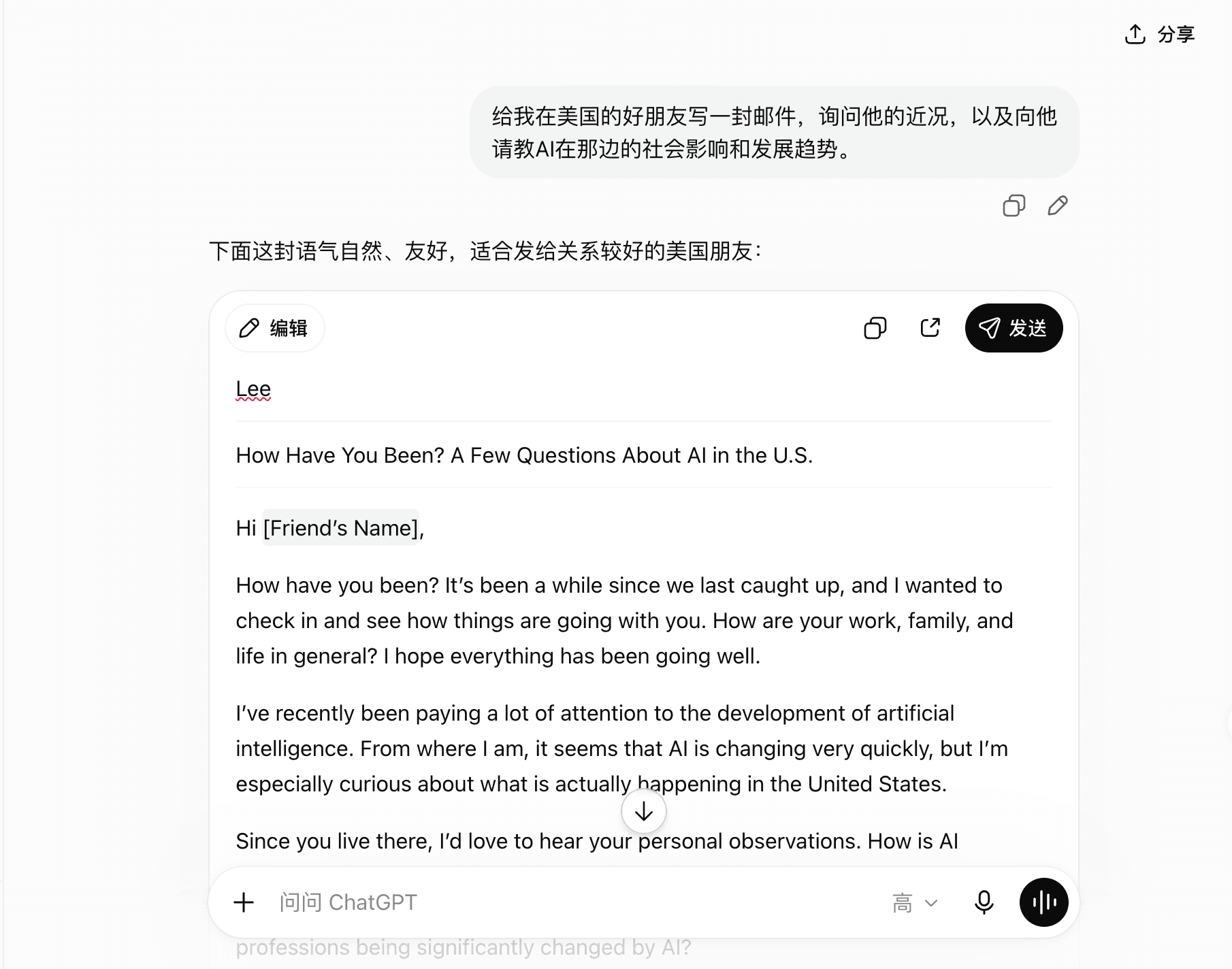
In the author’s documented email test, the first prompt asked ChatGPT to write to a close friend in the United States. The draft used “Hi [Friend’s Name]” because the preferred name was missing.
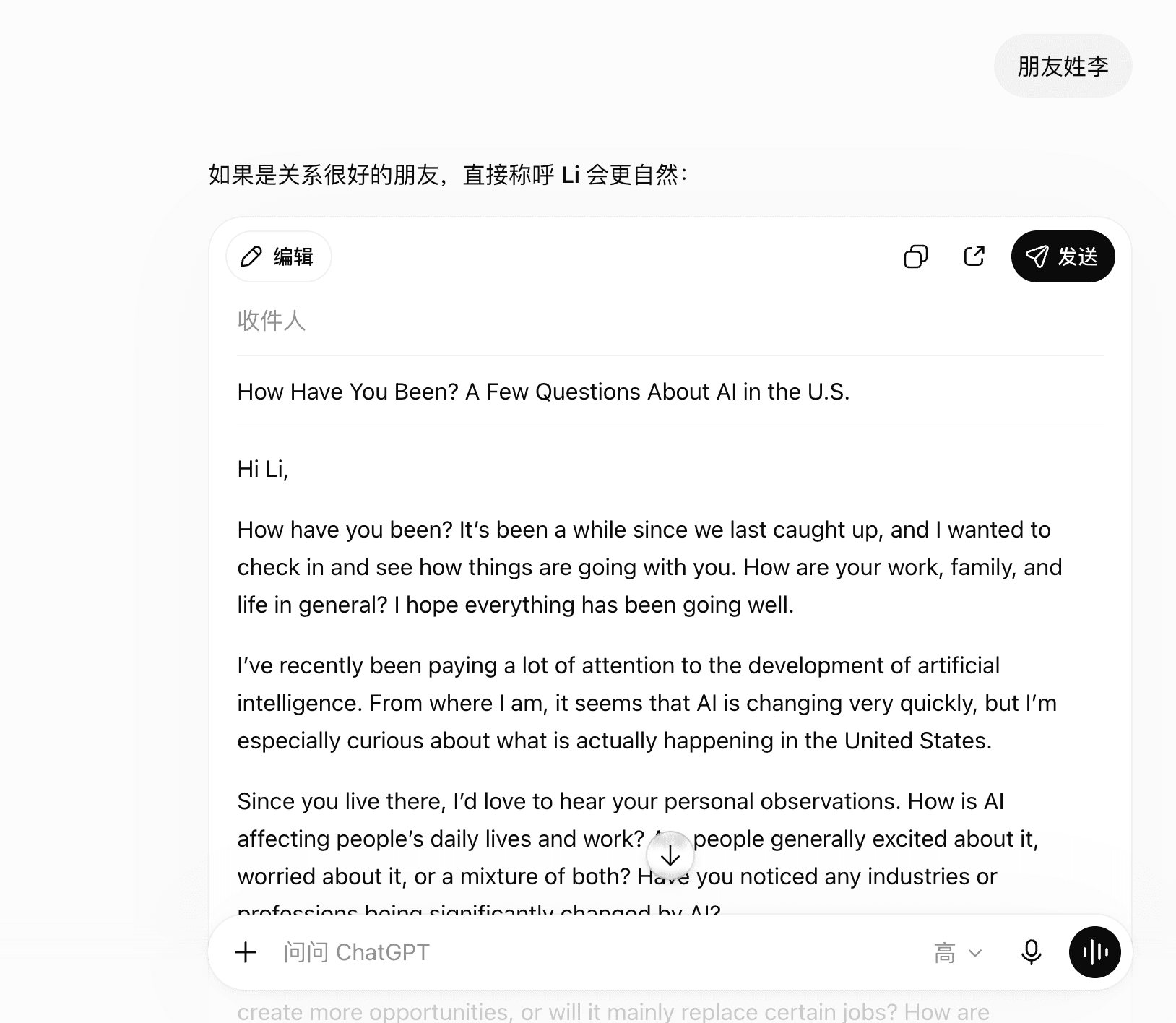
The actual follow-up was only:
朋友姓李
ChatGPT changed the greeting to “Hi Li.” The author confirmed that this friend normally uses Li as his name, so the correction fit this specific relationship.
Six useful kinds of follow-up
Add missing context
“The reader already knows the project. Remove the background.”
Change the tone or level
“Use simpler words and a calmer, less formal tone.”
Change the format
“Turn the answer into a five-item checklist.”
Correct a fact
“The event is on Thursday, not Friday. Revise the schedule.”
Ask for options
“Give me three endings: warm, direct, and professional.”
Expose uncertainty
“Which claims are you least certain about, and why?”
Correct assumptions without losing useful work
Name the exact part that is wrong and the exact part worth keeping.
Keep the three comparison criteria. The monthly budget is $50, not $500. Recalculate the table, remove any option above the real budget, and show the calculation.
After a correction, check the revised result again. A new answer can fix one problem and introduce another.
When to start a new chat
Start over when:
- You have changed to an unrelated task
- The conversation keeps using old instructions you no longer want
- You cannot tell which facts came from you and which came from AI
- The thread contains private details the new task does not need
- A clean summary would be easier to check than another revision
Begin the new chat with the confirmed facts, the current goal, and the limits that still apply.
A simple conversation pattern
- Ask for one clear result.
- Read the answer before sending another instruction.
- Say what is useful and what is wrong or missing.
- Change one or two important things at a time.
- Ask for sources when the answer makes factual claims.
- Check the final version outside the chat.
- Stop when the result is useful; do not revise forever.
Put it together
Try one complete beginner workflow.
Follow a real first conversation from a simple image request to an English email draft and revision.
Use ChatGPT for the first time →Common questions
Do I need to repeat my whole prompt?
Usually not. In the same conversation, refer to the part you want to keep and state the specific change you need.
How many follow-up questions should I ask?
There is no fixed number. Stop when the result is useful and checked, or start a new chat when the conversation has become confused.
Can I tell ChatGPT that it is wrong?
Yes. State the correct fact or provide a source, then ask it to revise only the affected part. Verify the new answer too.
Will ChatGPT remember my correction in a new chat?
Do not assume it will. Start the new chat with the context and constraints that the task needs.